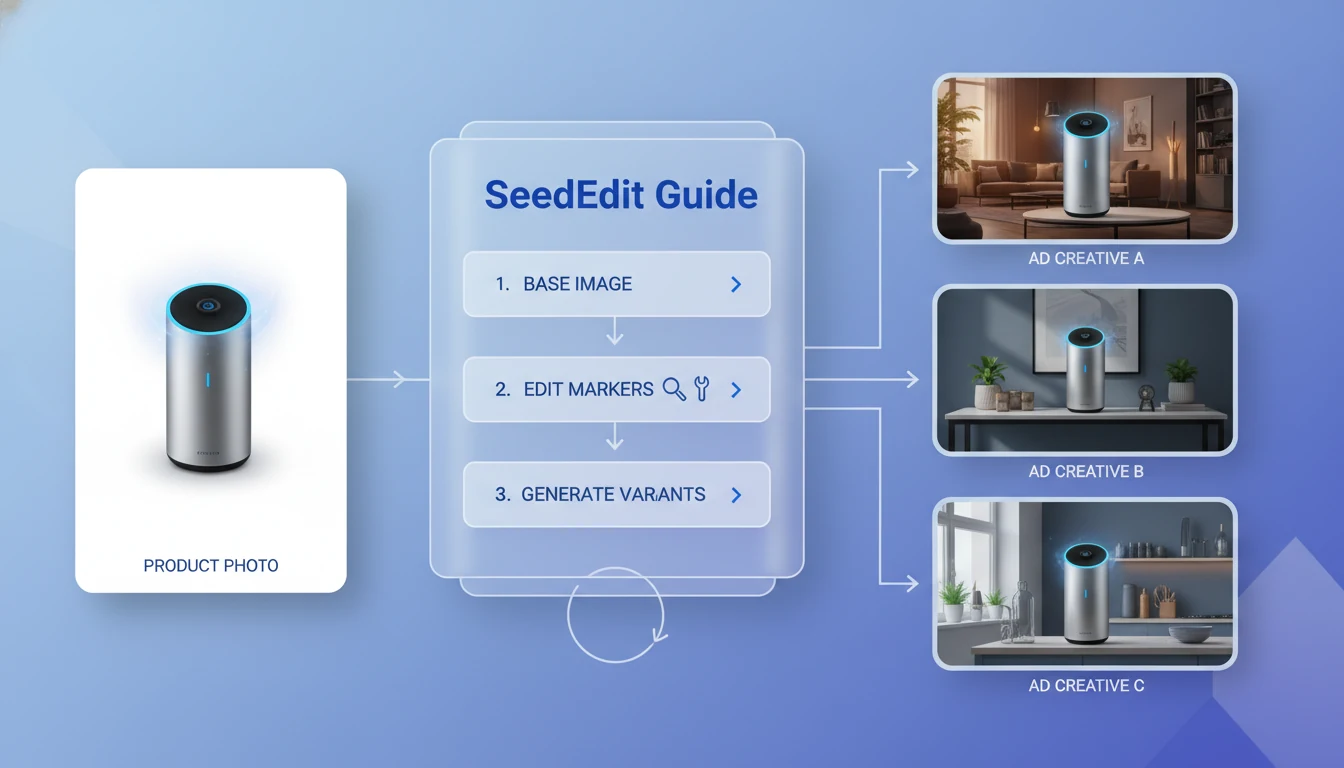
SeedEdit is most useful when you already have an image that is almost right. That is the real commercial use case. Most ecommerce teams, marketers, and performance creatives do not need a model that invents a brand-new concept from nothing every time. They need a model that can keep the product, keep the subject, keep the lighting logic, and then change one thing cleanly enough to ship another variant fast. That makes SeedEdit much closer to a controllable image-to-image workflow than to a pure generation-first tool.
That is why SeedEdit fits product photos and ad creative work better than generic "make me a new image" workflows. It is built around instruction-following image editing, not only generation. In practice that means cleanup, object swap, background replacement, text-region adjustment, lighting changes, and style changes are easier to control when you start from a strong source image. If your job involves repeated revision cycles, SeedEdit becomes more valuable on the second, third, and fourth pass than it does on the very first prompt. If you want the direct product surface, the dedicated SeedEdit page is the cleanest entry.
This guide focuses on three practical outcomes:
- better product photos without destroying the original product identity
- faster ad creative iteration without rebuilding layouts from zero
- a repeatable editing loop that helps teams keep quality while increasing output volume
The Short Answer
SeedEdit is a strong fit for product photos, ad creatives, and iterative AI image editing because it is optimized for instruction following and detail preservation. The public product messaging around SeedEdit 3.0 emphasizes stronger consistency, better usability, bilingual prompt support, and high-resolution editing. That matters because commercial image work usually fails in one of two ways: either the edit ignores the brief, or the edit obeys the brief but damages the subject you were trying to preserve. Teams already producing net-new assets with text to image often hit this editing problem immediately after the first concept is approved.
If your workflow starts from an existing image, SeedEdit is usually strongest in these scenarios:
- cleaning a product shot without reshooting it
- replacing or simplifying a background for marketplace and ad use
- restyling the same hero image into multiple campaign directions
- changing props, colors, surfaces, or atmosphere while keeping the main subject recognizable
- making controlled revisions across several rounds instead of one dramatic rewrite
| Use case | Why SeedEdit fits | Main risk |
|---|---|---|
| Product photo cleanup | Good at preserving product shape and key details while removing distractions | Over-editing can flatten texture or create artificial edges |
| Background replacement | Faster than manual cutout plus composite for many quick variants | Hair, transparent surfaces, and soft shadows still need QA |
| Ad creative variants | Lets you branch one approved visual into many campaign directions | Dense text layouts still need a designer pass |
| Offer and theme refreshes | Useful for changing color mood, props, seasonality, or setting | Too many instructions in one pass reduce reliability |
| Iterative testing | Works well when you modify one variable at a time | Teams waste credits when they chase too many changes at once |
The practical rule is simple: use SeedEdit when you care more about controlled transformation than raw invention. If the base image already carries the right product, subject, or brand direction, editing is usually cheaper than regenerating from zero.
What Makes SeedEdit Useful for Commercial Image Work
Commercial image editing is less about novelty and more about controlled variance. A useful editor must preserve what should stay stable and only change what should move. SeedEdit is valuable because its product framing centers exactly that problem: follow the instruction, keep the important details, and do it fast enough to support repeated revision. That also makes it a natural companion to text to image, image to image, and focused utility tools like AI Background Changer.
The most relevant strengths for marketers and ecommerce teams are:
- instruction-following edits instead of vague style drift
- better identity retention for faces, products, and fine details
- support for English and Chinese prompts, which helps multilingual creative teams
- fast turnaround that makes multi-pass iteration practical
- support for higher-resolution output that can still feed real design or storefront workflows
These strengths matter more in product photos and ad creatives than in pure art generation because the success criteria are stricter. The product color must still look like the product color. Packaging should not mutate. The hero object should not quietly change size or material between variants. A model that is merely "beautiful" is not enough. It has to stay accountable to the original asset.
That is also why SeedEdit should be treated as a controlled editor, not as a one-click brand system. It is best at directed changes with a clear source image and a narrow editing brief. It becomes weaker when the brief asks for a complete creative strategy, perfect typography, and campaign-wide consistency in one jump.
Workflow 1: Editing Product Photos Without Breaking the Product
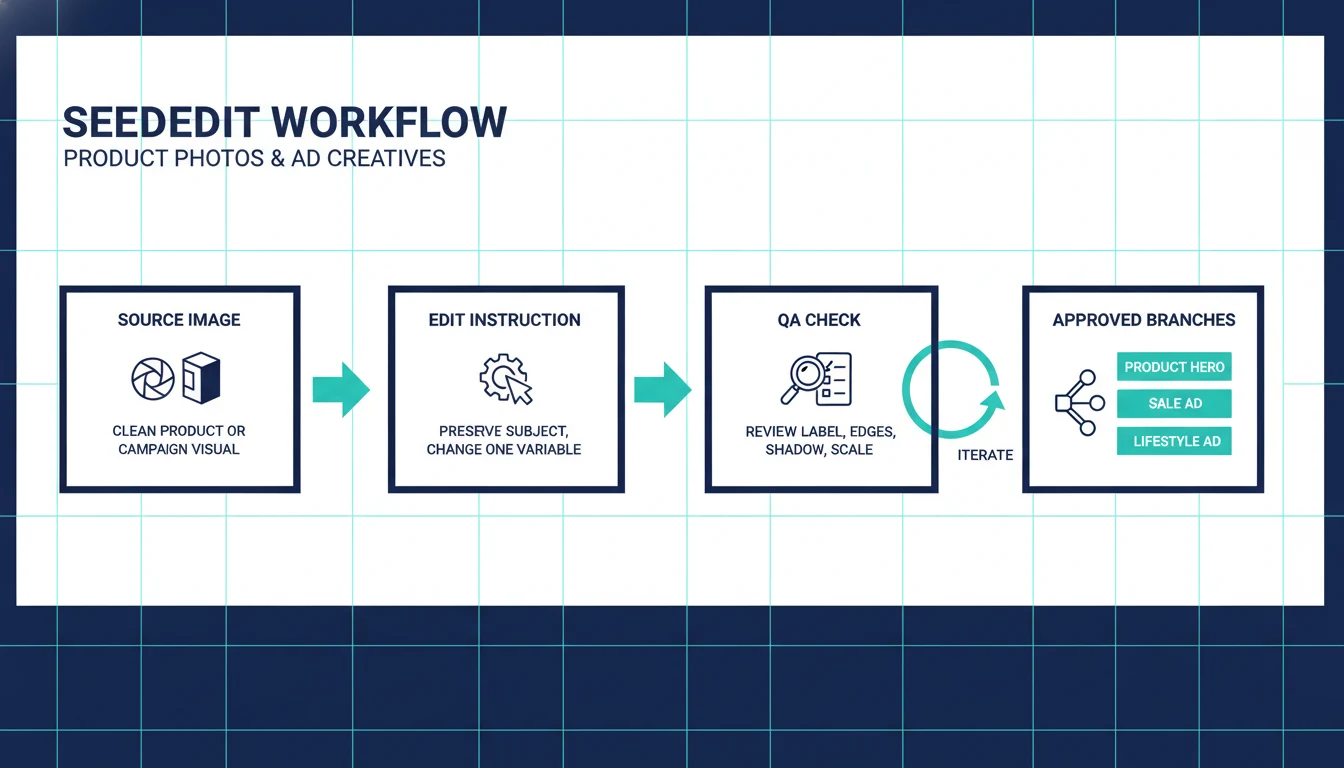
The most reliable SeedEdit workflow starts with a source image that already has one stable truth: the product itself. That can be a clean packshot, a tabletop photo, a lifestyle frame, or a marketplace image with decent lighting but weak presentation.
Use this sequence:
- Lock the non-negotiables. Write down what must not change: product shape, packaging text, label color, logo area, cap, texture, or material finish.
- Define one edit objective per pass. Ask for one primary change such as "replace the gray countertop with warm cream marble" or "remove the extra props and keep only the bottle with a soft studio shadow."
- Specify scene logic, not only style. Commercial edits improve when the model understands camera distance, lighting type, surface, and intended mood.
- Review edges and truth points. Check reflections, labels, shadows, transparent areas, and scale cues before approving.
- Branch only from winners. Once one version keeps the product intact, use that approved edit as the new base for colorway, background, or seasonal variations.
The prompt pattern below is much more reliable than a loose "make this prettier" instruction:
| Goal | Better prompt focus | What to review after generation |
|---|---|---|
| Clean marketplace shot | Remove props, keep exact bottle shape and label, retain realistic studio shadow | Label integrity, outline artifacts, shadow realism |
| Premium hero version | Keep product unchanged, move to soft luxury surface, warm directional light, shallow depth of field | Material fidelity, brand color shift, fake highlights |
| Lifestyle context | Keep product size realistic, place on bathroom or kitchen counter, natural daylight, minimal props | Scale, hand/object interaction, clutter |
| Background swap | Replace background only, preserve product edges and transparency, no change to label or packaging | Halo edges, glass transparency, shadow mismatch |
| Color emphasis | Increase contrast around product, deepen brand accent color without changing packaging design | Over-saturation, unintended recolor of label text |
A few rules make product editing much safer:
- describe what must stay fixed before describing what should change
- mention packaging, material, and label preservation explicitly
- use real photography language such as studio light, soft shadow, top-down, eye-level, clean negative space
- keep the first pass narrow, then widen only after you get a stable version
Common failure patterns:
- changing the product and the environment in the same instruction
- asking for too many style adjectives at once
- requesting small packaging text changes that really need manual design
- using a low-quality source image and expecting perfect fine detail retention
If the goal is a fast storefront cleanup, SeedEdit is often enough. If the goal is pixel-perfect packaging compliance for regulated products, you still need a manual finishing pass. When the core task is only subject isolation or scene replacement, AI Background Changer can be a cleaner first stop.
Workflow 2: Turning One Approved Image Into Many Ad Creatives
Ad teams rarely need one final image. They need a family of images built from the same approved subject. That is where SeedEdit becomes more useful than a generic image generator. Once one product photo or campaign visual is approved, you can use editing to create channel-specific branches instead of starting over every time. In most teams that branching starts after a text-to-image workflow or an earlier image-to-image workflow has already produced the base visual.
A good ad-creative loop usually looks like this:
- create one clean control image
- branch by audience or channel
- branch again by offer, season, or visual angle
- keep composition families recognizable enough for testing
- measure which direction wins before asking for more novelty
This approach is especially useful for:
- ecommerce product launches
- paid social testing
- marketplace thumbnail refreshes
- sale, seasonal, or bundle promotions
- UGC-style variants built from a polished base image
Use SeedEdit for changes such as:
- switching the setting from studio to lifestyle
- changing the surface, props, or color atmosphere
- adding campaign-specific negative space for copy overlays
- simplifying the scene for small mobile placements
- restyling the same product into luxury, playful, clean, or seasonal directions
The key is to think in branches, not in masterpieces. A performance creative team usually learns more from six controlled variants than from one heavily polished but untestable concept.
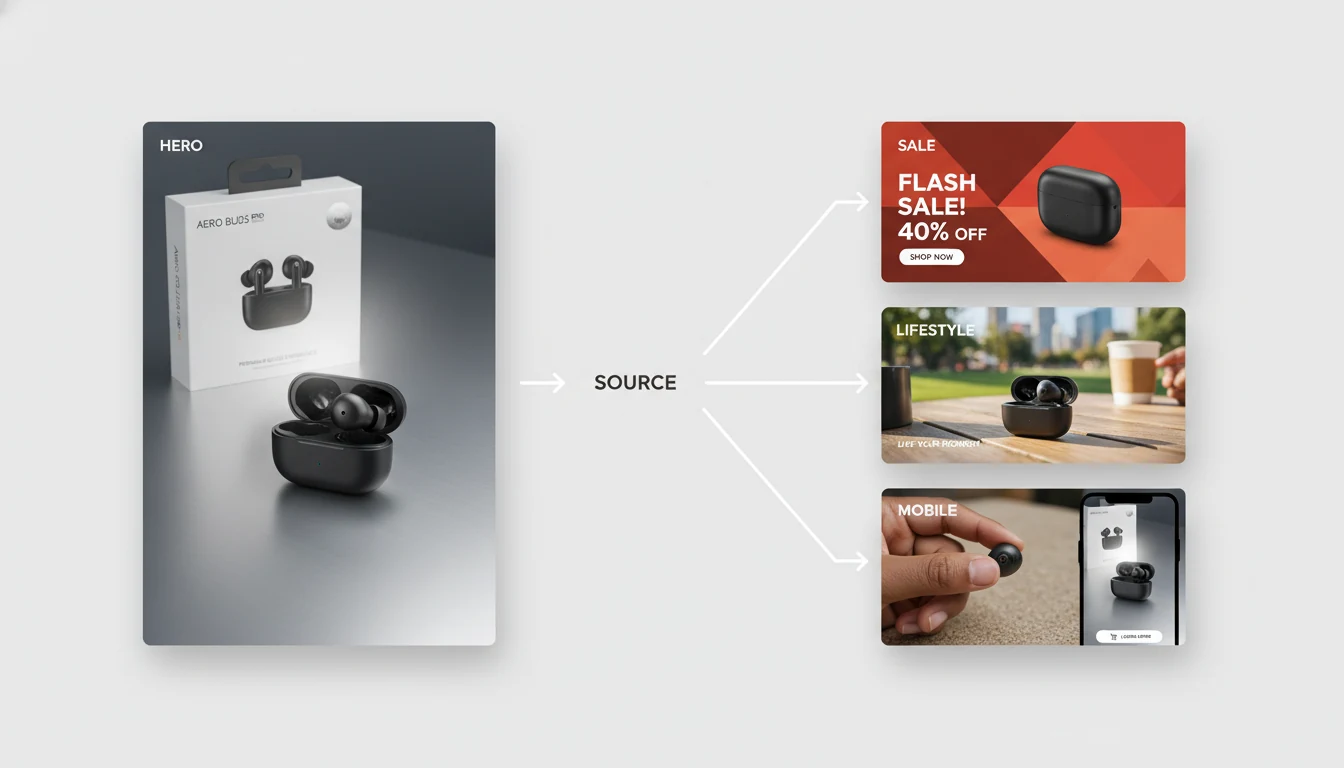
A practical branch map for ad creatives
| Variant type | Editing goal | Best SeedEdit instruction style | Why it helps |
|---|---|---|---|
| Product hero | Cleaner, more premium main visual | Preserve product exactly, upgrade lighting and surface only | Strong for PDPs, ads, and top-of-funnel creative |
| Sale creative | More urgency and offer framing | Keep product, simplify background, reserve space for headline or badge | Makes manual copy overlay faster later |
| Lifestyle ad | More context and emotional use case | Keep product identity, place in realistic usage scene with minimal props | Better for paid social and upper-funnel hooks |
| Mobile-first version | Stronger focal point at small size | Tight crop, one dominant subject, reduced clutter, stronger contrast | Improves readability in feed placements |
| Seasonal refresh | Same product, new campaign mood | Keep shape and label, change palette, props, and atmosphere only | Faster than rebuilding a new concept each quarter |
For ad work, avoid asking the model to generate final copy-heavy poster art in one pass. SeedEdit is much better at preparing a strong visual base than at locking perfect final typography. Treat text-heavy layouts as design tasks layered on top of image editing, not as pure image-edit outputs.
The Iterative Loop That Keeps SeedEdit Efficient
The biggest gain from SeedEdit is not one great prompt. It is the ability to run a disciplined loop. Teams lose quality when they keep stacking instructions onto a weak output. They lose money when every revision starts from zero. The right loop sits between those two mistakes. This is also the point where pricing starts to matter, because iterative editing is only efficient if the team is disciplined about branch control.
Use this iteration model:
- Start from the best source image available. A clean source saves more time than any prompt trick.
- Change one variable per round. Background, prop set, lighting mood, crop, or surface. Pick one.
- Approve or reject quickly. Do not spend five more edits trying to rescue a version with broken product truth.
- Branch from approved states. Turn good outputs into new starting points for the next set of edits.
- Stop when the job changes. If the request becomes layout design, long-copy ad production, or brand-system consistency at scale, switch tools.
This is the difference between efficient AI editing and credit burn. A controlled iterative loop also makes QA easier because you know what changed between versions. That matters when teams are comparing offer variants, seasonality, or marketplace compliance.
SeedEdit is especially efficient when you combine it with adjacent pages and workflows already in the site:
- use
/ai-background-changerwhen the main problem is clean subject isolation and quick background replacement - use
/pricingto estimate how many revision rounds your campaign actually justifies - keep SeedEdit for controlled edits and move to design tools for final copy placement or strict brand layout work
Where SeedEdit Still Breaks
SeedEdit is not magic. The model is useful precisely because its strengths are narrow and practical. Once you ask it to do everything at once, quality drops.
Expect limits in these areas:
- dense poster layouts with lots of small readable text
- exact packaging or label copy changes that must be compliance-safe
- perfect repeated brand consistency across dozens of assets without manual review
- difficult transparent materials, hair edges, reflections, and overlapping objects
- highly ambiguous instructions such as "make it luxury but playful and realistic and premium but minimal"
A simple way to protect output quality is to separate image tasks by layer:
- image truth layer: subject, product, lighting, environment
- campaign layer: offer framing, crop, visual hierarchy
- design layer: headline, pricing, badges, final typography
SeedEdit is strongest on the first two layers. It is weaker on the third.
When Seavidgen Is the Better Working Environment
If you only need one isolated SeedEdit experiment, a single-model route can be enough. If you need a browser workflow where SeedEdit sits next to adjacent models and tools, Seavidgen's SeedEdit page is the more practical setup. The reason is not ideology. It is workflow math.
A real creative team often moves between:
- image cleanup
- product photo enhancement
- background changes
- text-to-image expansion
- image-to-image variations
That kind of work benefits from a shared credit system and one workspace instead of constantly switching providers. The current SeedEdit product copy in the repository also states that one edit costs 10 credits, which makes disciplined branching important. If your team edits carelessly, iterative image work becomes expensive fast. If your team uses a clear approval loop, the same model becomes much easier to budget.
Use SeedEdit when:
- you already have a strong source image
- the subject must remain recognizable
- you need multiple controlled variants
- you want to shorten the path from approved visual to campaign branch
Do not use SeedEdit as the only tool in the chain when:
- the job is mostly layout design
- the copy needs to be exact and editable
- the brand system requires tight repeatability across a large asset library
FAQ
Is SeedEdit better than generating a new image from scratch?
Usually yes when the original subject matters. If the product, face, or base composition already works, controlled editing is more reliable than starting from zero and hoping the model recreates the same strengths.
Is SeedEdit good for product photos?
Yes, especially for cleanup, background replacement, prop simplification, mood changes, and faster hero variations. It is less reliable for exact packaging text fixes or heavily regulated product visuals that need strict manual review.
Can SeedEdit help with ad creatives?
Yes. It is most useful for branching one approved visual into multiple campaign directions. Think sale version, premium version, mobile-first crop, or seasonal refresh, not final copy-perfect poster design in one pass.
How should I write prompts for SeedEdit?
Lead with what must stay fixed, then state one main change, then add scene logic like lighting, crop, surface, and mood. The more the prompt tries to rewrite the whole image in one sentence, the less reliable the output becomes.
Does SeedEdit support iterative editing well?
Yes. That is one of its main strengths. It works best when each round changes one variable and approved outputs become the base for the next branch.
Is SeedEdit enough for a full production workflow?
Not by itself. It is a strong editing engine inside a broader creative workflow. Use it for controlled image changes, then hand off final typography, compliance review, and multi-asset brand QA to the right downstream tools.
Final Take
SeedEdit is not the editor for every image problem. It is the editor for teams that already know what they want to preserve. That makes it unusually effective for product photos, ad creative branches, and iterative AI image editing loops where speed matters but subject truth matters more.
If your workflow is built around controlled changes instead of one-shot invention, SeedEdit is one of the more practical tools in the current image stack. The teams that get the most out of it are usually not the ones chasing the wildest prompt. They are the ones running a tighter loop.